

Instance Scheduler
Automatically turn on and off your AWS EC2 and RDS instances.
About Instance Scheduler
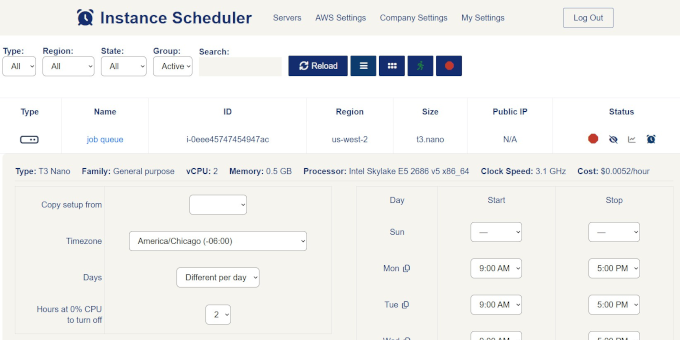
Instance Scheduler allows users to automate the management of AWS EC2 and RDS instances by scheduling their start and stop times. This tool is designed for system administrators and developers who need to optimize resource usage and reduce costs associated with running cloud instances.
By using Instance Scheduler, users can ensure that their AWS resources are only active when needed, helping to manage budgets and improve operational efficiency. It is particularly useful for environments where instances are not required to run 24/7.
Screenshots (1)
Works with
Features
- Schedule start and stop times for instances
- Supports AWS EC2 and RDS services
- Optimizes resource usage and costs
Use Cases
- Automatically turn off instances after business hours
- Start a group of servers with one click.
- Manage costs for development and testing environments
FAQ
What instances can I manage with Instance Scheduler?
Instance Scheduler can manage AWS EC2 and RDS instances, allowing you to automate their start and stop times.
How does Instance Scheduler help reduce costs?
By scheduling instances to turn off when not in use, Instance Scheduler helps minimize unnecessary charges associated with running cloud resources.
Is there a limit to how many instances I can schedule?
There is no specified limit on the number of instances you can schedule with Instance Scheduler, making it scalable for various needs.
Similar tools
More in Automation

RivalProbe
RivalProbe monitors competitor product prices automatically and sends reports when prices increase or decrease.

Marketing Star
Marketing Star automates multichannel campaigns across email, SMS, WhatsApp, QR codes, and web forms for small and medium businesses.

Stream Bot
Scans Twitch and Kick streams for standout moments and drops MP4 clip candidates into Telegram, ready to cut for Shorts, TikTok and Reels.
Discussion (0)
Log in to join the discussion.
No comments yet.